Gattica no longer works with the Google API as it does not support OAuth2. I am therefore moving a project away from using the Gattica gem (for Google Analytics access from the site) to using the Legato gem instead (along with the oauth2 or google-oauth2-installed gem).
oauth2 or google-oauth2-installed gem?
You now need to use the OAuth 2.0 protocol to interact with the Google API, which is why Gattica is no longer working and why we’re all here. Legato does not do this directly, instead you need to do this yourself or use a gem.
The oauth2 gem is “a Ruby wrapper for the OAuth 2.0 specification” and is to be used “when your application needs access as the user of your application”.
The google-oauth2-installed gem allows you to “Configure and authenticate to Google with OAuth2 as an installed application” and is to be used “when your application needs to authenticate to Google services, as opposed to your application’s users”.
Get and manage an OAuth2 Token using google-oauth2-installed
The google-oauth2-installed setup instructions are good (see the “Setup” section) so I will not go into detail here, except to say that it is important select the “Other” application type just after the first (create project) step, as explained here:
Click “APIs & Auth” > “Credentials”
Click “Add Credentials” > “OAuth2 Client ID” and select “Other” as the application type
The redirect URI is set to urn:ietf:wg:oauth:2.0:oob for you when you select this “Other” application type. You will get an Error: redirect_uri_mismatch or similar error when trying to use google-oauth2-installed with other Application types (that do not have the correct redirect URI)
Get an OAuth2 Token using oauth2
You probably do not want to do this, you probably want to use the google-oauth2-installed gem instead and skip this section. See above for details.
If you have read beyond the “Setup” section of the google-oauth2-installed setup instructions (i.e. if you have read the “Usage” section) you may already be in a position to access and use your Analytics data. Here is what I did:
Install google-oauth2-installed and set it up as shown above
Install legato
In lib/analytics.rb or somewhere:
 def sales_by_source
   get_google_analytics_profile unless @profile
   to_hash(Analytics::NewUsers.results(
       @profile,
       start_date: @start_date.strftime('%Y-%m-%d'),
       end_date: @end_date.strftime('%Y-%m-%d')
     ).to_a
   )
 end

 private

 def get_google_analytics_profile
   user = Legato::User.new GoogleOauth2Installed.access_token
   @profile = profile = user.profiles.first
 end

 def to_hash(array)
 result = {}
 referrer_count = 0 # new users from referring websites
 array.to_a.each do |row|
   # Group referring websites
   if row.source =~ /^([a-zA-Z0-9-]+\.[a-zA-Z0-9-]+)+$/
     source = 'referrer'
     new_users = referrer_count += row.newUsers.to_i
   else
     source = row.source
     new_users = row.newUsers
   end

   result[source] = new_users
 end
 result
  end
In lib/analytics/new_users.rb:
 class Analytics::NewUsers
   extend Legato::Model
   metrics :newUsers
   dimensions :source
   filter(:source) {|s| matches(:s, source)} # not used in this example
 end
I don’t need to do this very often, so when I do there is always something I need to look up. So time to make some notes…
cd ~/projects/
I already have rails installed, if you don’t you’ll need to get it installed. There are some notes on this site that cover getting an Ubuntu or Mac set up that may help.
rails new example
cd example
Next you need to add rspec-rails to your Gemfile (in the :development and :test groups). You can do this the easy but fractionally more laborious way by adding gem 'rspec-rails' to your Gemfile, or by using this super-cool line (courtesy of the relishapp.com help files): echo "gem 'rspec-rails', :group => [:development, :test]" >> Gemfile
Manually adding gem 'rspec-rails' to your Gemfile will result in a slightly neater Gemfile
bundle
rails generate rspec:install
Now to add something to your new site to test. Lets say, for example, you want to keep a record of given/long URL’s and corresponding generated/short URL’s, you may do something like rails generate scaffold Url long_url:string short_url:string.
I prefer HAML to ERB view files, so I did this (skip these steps if you are happy with ERB)
If you ran the rails generate above you can undo it like this rails destroy scaffold Url long_url:string short_url:string
Add gem 'haml' and gem 'haml-rails' to your Gemfile
The tests should pass, with some pending tests. Congratulations, you have now set up rails with tests and can go ahead and get all tests working and/or add new functionality (as shown below)
Get the skipped/pending tests working
Valid URLs
Replace skip("Add a hash of attributes valid for your model") with something like {long_url: 'http://www.mysite.com/some-kind-of-page.html', short_url: 'http://me.co/hrt12'} in urls_controller_spec.rb to get most of the pending tests passing (as you can see by running rspec again).
Invalid URLs
Replace skip("Add a hash of attributes invalid for your model") with something like {long_urls: 'not a valid long url', short_url: 'not a valid short url'} and run rspec again.
We get some errors. The top errors can be fixed by adding validation to the Url model. We should not allow invalid URL’s, so lets try validates_format_of :long_url, :short_url, :with => URI::regexp(%w(http https)).
Running rspec shows fewer erros, all of which are from view specs/tests. Replace entries like :long_url => "MyString" (which are not valid according to the validation we just added) with something like :long_url => 'http://www.mysite.com/some-kind-of-page.html'.
Do rspec again and all tests are passing again, but we still have 3 pending. One of them is easily fixed following the same route as above and the last two are for UrlsHelper which is not yet implemented.
Congratulations, you have now set up rails with working tests and can go ahead and add new functionality.
Add new functionality
I’d like to generate short URL’s based on the user supplied long URL’s (rather than asking the user to supply both). To do this we first need to update our tests… (I’ve run out of time for now, so the rest of these notes are pending)
Because ruby methods are named well in general, with easy to remember or guess names this sheet should stay relatively empty. These are some memory joggers…
require 'spec_helper'
require './lib/parser'

describe Parser do
  let :prime_numbers do
    [2,3,5,7,11,13,17,19,23,29]
  end

  it 'can return the first 10 prime numbers' do
    # The line below will work if `first_ten_prime_numbers` is not protected/private
    # expect(Parser.new.first_ten_prime_numbers).to eq (prime_numbers)
    expect(Parser.new.instance_variable_get(:@prime_numbers)).to eq (prime_numbers)
  end

  xit 'can return the whole table as an array of strings' do
    expected_result = [' 2 |   4   6  10  14  22  26  34  38  46  58']
    expected_result << ' 3 |   6   9  15  21  33  39  51  57  69  87'
    # etc...

    expect(Parser.new.parse).to eq(expected_result)
  end
end
lib/parser.rb :
require 'optparse'
require 'prime'

# Uncomment line below when lib/other_file.rb and spec/lib/other_file_spec.rb are in place
# require_relative 'other_file_in_same_folder' # like require_relative './other_file'

class Parser
  def initialize
    @prime_numbers = first_ten_prime_numbers
    @options = {}
    OptionParser.new do |opts|
      opts.banner = "Usage: parser [options]"

      @options[:something] = :first_option # default

      # Scan the ARGV for a filename and raise if ARGV is empty
      opts.parse
      @options[:filename] = ARGV.pop

      # Could raise an error insted of using this default
      @options[:filename] = 'webserver.log' unless @options[:filename] # default

      # Optional argument with keyword completion for type
      opts.on("-t", "--type [TYPE]", [:first_option, :second_option],
              "Select type (first_option, second_option)") do |t|
        @options[:something] = t
      end

    end.parse!
  end

  def parse
    # Do stuff
  end

  def first_ten_prime_numbers
    @prime_numbers ||= Prime.first 10
  end
end
Run rspec to test
Command Line
Run chmod u+x bin/parser to make parser executable (from the command line, for example bin/parser)
bin/parser -t s filename for :something=>:second_option, :filename=>"filename"
bin/parser -t first_option filename for :something=>:first_option, :filename=>"filename"
The Chartkick gem makes adding good looking charts to your Rails site really easy. It allows you to render Google Charts or HighCharts with ease.
One small thing that it didn’t do was percentage (percent) or relative charts. These were already supported by Google Charts and HighCharts, so it was relatively easy to add this functionality to Chartkick.
I forked the project and added this functionality (as you can see here), and created a pull request to get this added to the original gem.
To Use Percentage Charts with Chartkick
While the pull request is pending, you’ll need to change gem 'chartkick' to gem 'chartkick', :git => 'git://github.com/avjaarsveld/chartkick.git' in your Gemfile and run bundle install.
To keep your current Chartkick charts working and looking like they normally do, do nothing. stacked: true still works.
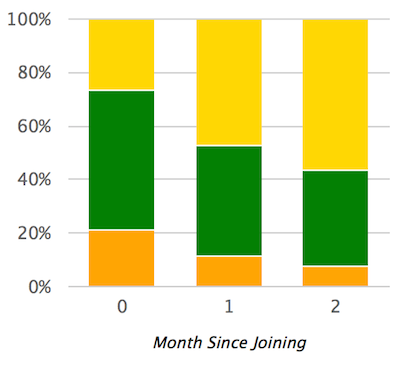
To make a Chartkick chart a stacked percent chart, add stacked: "percent" as an option, as shown in the example below.
The above example will work if @failing_assessment_count_by_month = [[0.0, 360], [1.0, 255], [2.0, 166]] and @passing_assessment_count_by_month = [[0.0, 870], [1.0, 905], [2.0, 766]] and @excelling_assessment_count_by_month = [[0.0, 450], [1.0, 1032], [2.0, 1209]]
(for example), which you’d set in the controller.